|
|
 
|
|


Works with Android Devices
Works with iPhone, iPod Touch, iPad
Standalone MPG Scan Tool
Green Driving Learning Tool
Customizable OBD II Multi Gauge
Customizable Multi Gauge
Works with iPhone, iPod Touch, iPad
Works with Android Devices and PC Computers
Kiwi Wifi
$14999
Overview:
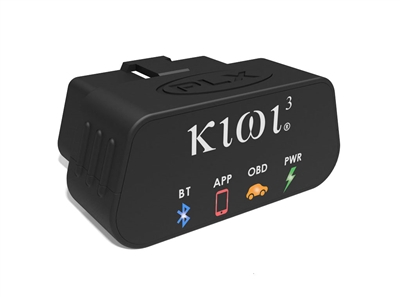
Kiwi Wifi is a plug and play automotive tool that connects through the onboard diagnostic port (OBDII). Kiwi Wifi installs in seconds to interface with your car's computer and sync with your iPhone, iPod Touch and iPad through a wireless Wifi connection in 802.11a/b/g adHoc mode. The Kiwi Wifi allows you to efficiently monitor your car's MPG, analyze the log, diagnose trouble codes and monitor real time engine performance. *only compatible with 1996 and later vehicles.
Features:
Depending on the application, the following features may be available:
  • Check Engine Diagnostics
  • Real-time gauges
  • Fuel Efficiency and MPG
  • Engine Sensors
  • Customizable Dashboard
  • Real-time Dyno
  • Data Logging
  • GPS Track Mapping
  • Skid Pad
  • Video recording and data overlay
  • Aftermarket sensor interface
  • Apps
  • Video
  • Technical Specifications
  • Included Items
  • OBDII Sensors
  • Awards
Kiwi Wifi is compatible with:
  • Dash Command App Icon
    Dash Command
  • Rev App Icon
    Rev
  • FuzzyCar App Icon
    FuzzyCar
  • Speedport App Icon
    Speedport
  • Harry's Lap Timer Pro App Icon
    Harry's Lap Timer Pro
  • BMWhat App Icon
    BMWhat
  • OBIE App Icon
    OBIE
  • ScanXL Icon
    ScanXL for PC
Dash Command Icon
© 2010 Palmer Performance Engineering, Inc.
DashCommand for Apple iOS Devices
*Compatible with PLX Logger 3.0
WANT GAUGES? This is the app for that. DashCommand is the ultimate OBD-II supplementary vehicle instrumentation application available for the iPhone and iPod touch. The built in dashboards can display a total of 27 gauges pulling data directly from your ride's engine control module. Also use DashCommand as scan tool to read and clear the trouble codes that caused the "check engine light" to turn on, a trip computer, or a race day companion.

--- SEMA Show 2009 1st runner-up for best mobile electronics product.
--- Winner of 9 Global Media Awards at SEMA Show 2009

Additional Features:
  • Professional skidpad showing lateral and accel/braking Gs with min/max indicators
  • Race track visually maps out your location, acceleration and braking as you drive laps around the track allows you to visually analyze different race track laps to see how acceleration and braking changed from lap to lap thus helping you to improve your lap times on your next outing.
  • Inclinometer shows rolling angle and vehicle pitch for off-roading.
  • Full support for OBD-II diagnostics, find out why your check-engine light is on and clear diagnostic trouble codes (DTCs)
  • Data logging, record and playback log files showing OBD-II data and skidpad/race track data simultaneously
Dash Command Menu
Dash Command Engine Screenshot
Dash Command Fuel Economy Screenshot
Dash Command Performance Screenshot
Dash Command Trip Stats Screenshot


REV Icon
© 2010 Devtoaster
Rev
Rev monitors, displays, charts, and records real-time data by interacting with your vehicle's onboard diagnostic system. Rev can also check and reset "Check Engine" lights and trouble codes and much more!

** Proud Winner of the 2009 Popular Mechanics Editor's Choice Award! **
Rev 2.0 now has a great suite of features:
  • Display of up to 5 metrics at once with a drag-and-drop customizable interface: position gauges however you want and save configurations for later.
  • Store information about your vehicle: Rev remembers details about your vehicles so it can accurately calculate horsepower and other metrics.
  • Check Engine light on? Want to get rid of the nagging light on your dash? Rev supports engine trouble code checking, translation, and resetting.
  • Logging: record and review time-based or GPS-based data. Export data runs as Excel-compatible CSV data.
  • GPS Track: Using the iPhone's GPS, learn about your acceleration and braking on the road and on the circuit. Green and red colors represent moments of forward and braking acceleration. Perfect your cornering habits and master the track.
  • Save time and money! Check your emissions before going to the shop! Readiness monitors include 11 vehicle tests that your vehicle must have "ready" before it can pass emissions tests in most states. Rev will tell you which tests are supported for your vehicle, and whether or not they are ready. Some great info can be found here: http://www.wivip.com/monitor052108.pdf
  • Acceleration: Displays, records, and charts your cornering, braking and acceleration G-forces.
  • Automatic metric bounds adjustment.
  • Redline: give any metric a redline value.
  • PLX Kiwi Wifi + iMFD support. Use Rev to interface with PLX's extendable iMFD sensor system.

 
FuzzyCar Icon
FuzzyCar
     
FUZZYCar is an iPhone application that connects your cars' computer (ECU) directly to the Internet using the Kiwi WiFi from PLX Devices. Using FUZZYCar, you can see all of the diagnostic sensors your car supports right on your iPhone, including Speed, RPMs, Oxygen Sensor data, and the status of your Check Engine Light.

FUZZYCar can also diagnose the exact Diagnostic Trouble Codes (DTC) every time your check engine light comes on, and can even clear your check engine light immediately. Each copy of FUZZYCar also gives you a free account on fuzzyluke.com. Now you can keep track of multiple cars, and analyze all of your cars historical diagnostic data. You don't just get a one-time snapshot or spreadsheet, you get to keep track of it all using the FUZZYLUKE analysis engine. Your fuzzyluke.com account will also let you setup email alerts, so that you can keep track of problems as they occur in all of your cars.


Sppedport Icon
© 2009-2010 AutoSpeed Performance, LLC.
Speedport
SpeedPORT allows you to switch performance profiles of your vehicle's Engine Management Software, Scan Diagnostic Trouble Codes, Reset Check Engine Lights, View Engine Parameters Real-time and more!

SpeedPORT was developed by AutoSpeed to complement the line of performance tuning software for Audi, Volkswagen and Porsche automobiles.

The SpeedPORT application has 3 main functions: Profiles, Scan Codes and DataDASH.
Harry's Lap Timer Pro Icon
Harry's Lap Timer Pro


Harry's LapTimer is the advanced tool for car enthusiasts. It records all types of sensor data provided by your iPhone/iPod/iPad (or external sensors), combines them, and makes them available to optimize your drive. Over time, you will get insights on your car and in your driving.

LapTimer offers more than 300 predefined tracks worldwide. With its assistants, it is extremely easy to setup - just click your track and drive. It fully automates your lap timing using GPS, and presents the results to all kinds of media.

You are not limited to track driving only. For example, you may define your home and working locations as a 'track', collect statistics on different ways chosen, and analyze / optimize the time used every day.

Want to show your drive to your friends? LapTimer generates beautiful in-car video recordings with all kinds of data overlaid, ready to be presented - e.g. on YouTube. Even without video, recorded data can be analyzed using purpose designed views, making it easy to analyze and improve your driving performance. Using online racing, you can use LapTimer in competition. LapTimer offers a Hall of Fame, which allows for watching you and your friends on track - all in real time. Compare your sector times, braking / acceleration points, and learn from each other.

You can start with your plain iPhone in the beginning and add external GPS and OBD II sensors later, step by step, as you need them. LapTimer comes in three different versions. LapTimer Standard can be enhanced later by added in app purchase features, LapTimer Professional is the 'all-in-one with free lifetime updates' version dedicated to the iPhone and iPod. Finally, there is an iPad optimized version named LapTimer Trainer. Please note that functionality depends on your device, the LapTimer version chosen, and sometimes even external sensors added (like OBD II). Check our home page for details.

There are quite expensive stand alone solutions for track days available. Be smart and own the leading edge tool simply by using your iPhone and LapTimer. Besides the professional area, there is no known solution that offers more functionality than LapTimer does - across the market. As our ambition is to offer the best tool, LapTimer is continuously enhanced.

Please visit http://www.gps-laptimer.de for detailed information on versions, FAQs / documentation, in-depth technology background information, online racing, and supported device configurations. Join our user community at http://www.gps-laptimer-forum.de to be involved in future development - all with first class support.
BMWhat Icon
BMWhat


Would you like to diagnose your BMW?

With this app you can read out BMW specific and OBD fault codes (DTCs) like the experts.

While normal OBD Readers are limited to a small number of electronic control units (ECUs) and even a smaller number of fault codes, this app reads out practically all compatible BMW specific ECUs.

Normally this is only possible with very expensive expert equipment.

Now you can check your car yourself in-depth!

It provides modell specific fault code explanations.

...and you can even clear the stored BMW DTC fault codes - not just OBD!

PLEASE TRY THE FREE LITE VERSION FIRST TO VERIFY COMPATIBILITY!

For a demo you may like to check www.iViNi-apps.com


Harry's Lap Timer Pro Icon
OBIE


OBIE is an excellent and easy to use Automotive Gauge Display that lets users access real time data such as boost, coolant temp, and miles per gallon through the OBD-II port.

OBIE brings important vehicle information to a user's vehicle with an intuitive design for quick access to three scrolling gauges.

  • OBIE supports the following parameters (also depends on vehicle itself)
  • Ambient Air Temperature
  • Barometric Pressure
  • Boost (MAP)
  • Coolant Temperature
  • Engine Load
  • Fuel Pressure
  • Instantaneous Miles Per Gallon
  • Intake Air Temperature
  • Oil Temperature
  • Speed
  • RPM
  • Timing Advance
  • Throttle Position
  • Voltage
  • MIL Status


ScanXL™ Professional
ScanXL™ is our professional line of diagnostic scan tools. Built on top of our advanced scan tool technology, ScanXL™ delivers the full range of generic diagnostics for any OBD-II compliant vehicle sold worldwide, along with providing manufacturer-enhanced diagnostics for many vehicle types. It gives you access not only to the powertrain systems, but also ABS, airbag, and other proprietary systems that would otherwise require expensive dealer tools to work with. It allows viewing, charting, logging and playback of diagnostic data in real time via the vehicle's OBD-II diagnostic data port. It also allows viewing of vehicle Diagnostic Trouble Codes (DTC's), Freeze Frame data, and other vehicle information.

ScanXL™ supports 1996* and newer vehicles whether it be US, Asian, or European.

Supported OBD-II protocols: SAE-J1850 (PWM and VPW), ISO-9141, ISO-14230 (KWP2000), and ISO-15765 (CAN).

Visit our user forum for discussion and information about ScanXL™, product features, and new releases.
*1996 is the year the OBD-II system was standardized for passenger vehicles sold in the United States. In Europe, this was standardized in 2001 for gasoline vehicles and 2004 for diesel passenger cars. Please verify that your vehicle is OBD compliant before purchasing.
J2534 Overview
Legislation has mandated that vehicle manufacturers meet J2534 standards for all emissions related systems on all new vehicles starting with model year 2004. This standard enables independent service repair operators to program or reprogram (reflash) emissions related ECUs on a wide variety of vehicle manufacturers with a single hardware interface. Our ScanXL™ Professional diagnostic software supports all J2534 compliant pass-thru OBD-II interfaces. If you plan to buy or already use a J2534 interface in your service or repair facility to update vehicle software calibrations, our ScanXL™ product will be the perfect addition to your tool set. With no additional hardware costs, ScanXL™ Professional will give you access to dealer-level diagnostic capabilities for thousands less!
Manufacturer Enhanced Diagnostics
If you are the owner of an independent service or repair facility then you know that good tools can mean the difference between being able to find and fix the problem, or having to send the customer elsewhere. With generic only OBD-II scan tools you often cannot service some vehicle systems like ABS, airbag, or other proprietary systems. Using our ScanXL™ diagnostic scan tool, you now have access to dealer-level diagnostic capabilities for not only the powertrain systems, but also ABS, airbag, and other proprietary systems that would otherwise require expensive dealer tools to work with*.

We currently support the following vehicle types:
Ford, Lincoln, Mercury(1996-2009)
GM(1996-2009)
Mazda(1996-2009)
Chrysler, Dodge, Plymouth, Jeep, EagleComing Soon!
Toyota, Lexus, ScionComing Soon!
*Requires purchase of an enhanced diagnostics add-on package.
ScanXL™ Features
Vehicle Manager
  • Using the ScanXL™ Vehicle Manager you can keep track of multiple vehicles and owners simultaneously.
  • All vehicle specific information is stored in the Vehicle Manager.
  • Automatically keeps track of VIN (if available) and date and time of last diagnostic session.
  • When adding new vehicles, supports easy vehicle lookup through the built-in vehicle database.
Virtual Dashboards
  • With our patent-pending DashXL™ technology you get high quality dashboards on any screen size.
  • Highly configurable realistic looking gauges.
  • Gauges can be moved, resized, and laid out to resemble your own dashboard.
  • Virtual dashboard layouts can be loaded and saved from pre-existing templates or your own custom creations.
  • Gauges can be configured to report the minimum, maximum, and average values of the parameter being monitored.
  • Highly configurable graphs allow simultaneous graphing of up to 8 parameters per graph.
  • Tables can be placed on virtual dashboards and customized to report any parameters you want.
  • Maps can be placed on virtual dashboards and customized to display a full 3D view of any desired parameters.
  • You can set up an unlimited number of gauges, graphs, tables, and maps on your virtual dashboard.
Drag Strip and Dyno
  • The drag strip displays a countdown and timing light and measures your launch and reaction time. At the end of your run, you get a timeslip with the stats from the run.
  • Measures reaction time, 60' time, 330' time, 0-60 MPH, 1/8 mile ET, 1/8 mile speed, 1000' time, 1/4 mile ET, 1/4 mile speed.
  • If you use aftermarket performance parts, the new digital dyno feature will let you test horsepower and torque to measure their impact on your vehicle's performance-- just try out the dyno and see if those parts were worth the money!
  • Supports both English and Metric units of measurement.
Data Logging
  • Currently supports over 220 generic OBD-II parameters, including O2 sensors.
  • You can record and playback log files in real time (1ms logging accuracy).
  • You can save and load your log files for offline analysis.
  • Playback speed can be adjusted to play faster or slower than real time.
  • There are no restrictions on how much data you can log, it is only limited by how fast your OBD-II interface cable can send the data and by how much memory you have in your computer.
  • English and Metric (SI) unit measurement systems supported.
  • Customizable log file data export to .CSV file for easy viewing in other programs like Excel.
  • Export with real-time stamps for easy correlation with external data logs.
  • PIDs can be assigned priorities to speed up the data capture rate.
  • Full support for data log file bookmarks - if you notice the engine misfiring or some other problem, using the log file bookmarks you can just reach over and press F6 to add a bookmark into the logged data that is being recorded. Then you can come back at any time and see exactly where the bookmark is and view the surrounding frames of data to analyze the problem.
Trouble Codes
  • Read stored and pending Diagnostic Trouble Codes.
  • Clear the Check Engine or Service Engine Soon indicator light.
  • Read and clear stored Freeze Frame data.
  • Supports thousands of vehicle trouble code definitions.
Test Results
  • Read the status of Continuously and Non-Continuously Monitored Tests.
Miscellaneous
  • Full support for printing and print preview.
  • All of the different views, including the virtual dashboards, support printing/print preview.
  • For those who possess a knowledge of the OBD-II protocol, ScanXL™ provides an OBD-II Terminal where you can send custom commands to the vehicle.
  • For the power users out there, ScanXL™ has built-in Javascripting support to do custom calculations on OBD-II parameters and data.
  • Configurable alerts system - the alerts system allows you to configure the software to monitor any parameter(s) you like. When the specified conditions are met, the software will automatically play a sound (to warn you if you are driving) or insert a bookmark for you into the logged data that is being recorded.
  1. Link Indicator LED
  2. Power Indicator LED
  3. 6' Cable
  4. OBD II Plug
Physical Dimensions: 1.25 x 2.72 x 0.60 (inches)
Power Consumption: 1.24 Watts (Typical)
OBDII/CAN Protocols: ISO-9141,VPW,PWM,KWP 2000,11Bit,29Bit CAN
Compatible Vehicles: 1996 and later vehicles
Operating Temperature: -40 - 105 Degress Celsius C
Operating Voltage: 10 - 18V
Wireless Standard: Wifi 802.11 a/b/g
Range: ~50ft line of sight
Enclosure: Automotive grade
Compatible Apps: Rev, DashCommand, FUZZYcar, Speedport, PLX Logger and Torque*

* = Using the Kiwi Wifi with Torque requires rooting your Android phone. PLX Devices does not advise this option. Please see Kiwi Bluetooth
  • Kiwi Wifi Main Unit
  • User Manual
  • * All applications are downloaded through the Apple App Store.
    Some apps may need to be purchased seperately from the Kiwi Wifi.
Depending on your vehicle and the application that you choose to use, sensor support will vary. However in most vehicles the following sensors are reported through the onboard diagnostic port.
  • RPM
  • Vehicle Speed
  • Throttle Position
  • Engine Load
  • Absolute Engine Load
  • Engine Timing
  • Air Intake Temperature
  • Coolant Temperature
  • Ambient Air Temperature
  • Intake Pressure (MAP)
  • Air Flow (MAF)
  • Fuel Pressure
  • Fuel Pressure Relative
  • Fuel Level
  • Barometric Pressure
  • Catalytic Converter Temperature
  • ECU Voltage
  • OBD Type
  • Short Term Fuel Trim (Bank 1)
  • Long Term Fuel Trim (Bank 1)
  • Short Term Fuel Trim (Bank 2)
  • Long Term Fuel Trim (Bank 2)
  • Oxygen Sensor Voltage1 (Bank 1)
  • Oxygen Sensor Voltage1 (Bank 2)
  • Oxygen Sensor Voltage2 (Bank 1)
  • Oxygen Sensor Voltage2 (Bank 2)
The Kiwi Car to Smartphone line of products has received these awards:
SEMA Best New Mobile Electronics Entertainment Product, Best New Interior Accessory Product 2008
Popular Mechanics Editor's Choice Award 2009
SEMA Global Media Choice Award
SEMA Best New Mobile Electronics Entertainment Award 2010
Numerous Global Media Choice Awards 2010-2011
Popular Mechanics Editors Choice Award